
SonarMite App3.0 - Get APK
You'll be able to download in few seconds.
Publisher Description
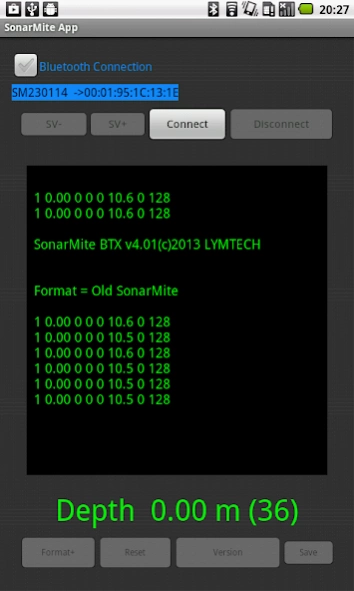
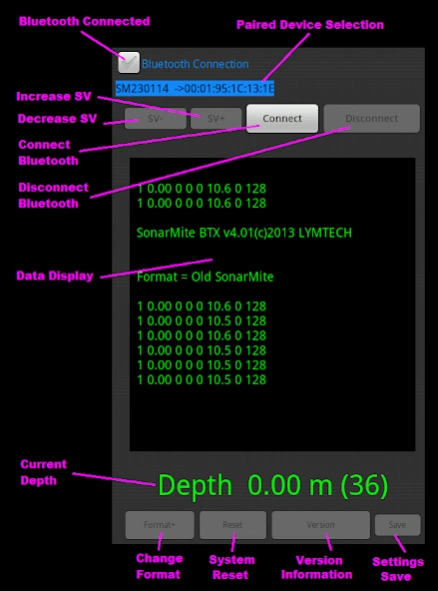
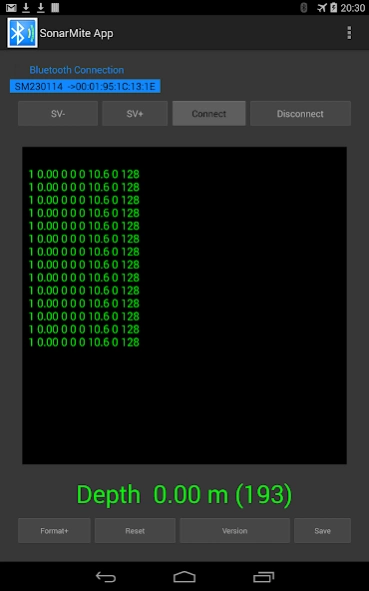
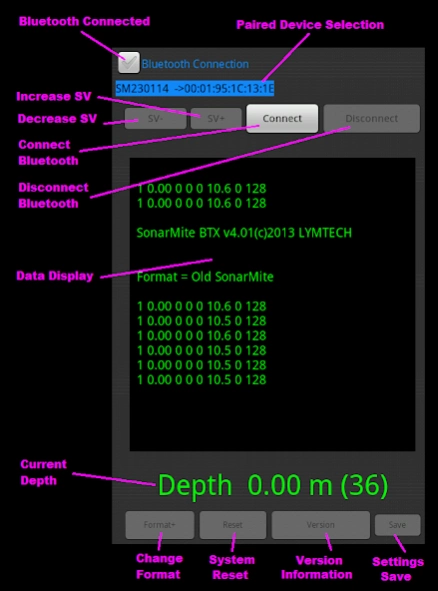
A terminal App for working with the SonarMite Bluetooth sonar device
SonarMite App is an Android App designed to work with the popular SonarMite Bluetooth Echo Sounder used in hydrographic surveying applications. With the demise of Hyperterminal as a standard terminal application the end user is left with little choice for a simple communications program with serial data devices. Connecting via Bluetooth is cleaner than USB cable, there are no wires and the connection is independent of baud rate and other serial port settings. Most terminal programs are not easily configured with commands to directly interface with instruments such as SonarMite. The App is dedicated to connecting to the SonarMite and providing most simple commands via pre-programmed buttons. Dedicated buttons give a more intuitive interface than using the dropdown keyboard or voice interface. Buttons include ‘Format’ to change the data output format, ‘Version’ will show the current firmware version and ‘Reset’ will cancel any changes and set the instrument back to its default settings.
About SonarMite App
The company that develops SonarMite App is Lymetree Associates. The latest version released by its developer is 3.0.
To install SonarMite App on your Android device, just click the green Continue To App button above to start the installation process. The app is listed on our website since 2015-05-21 and was downloaded 0 times. We have already checked if the download link is safe, however for your own protection we recommend that you scan the downloaded app with your antivirus. Your antivirus may detect the SonarMite App as malware as malware if the download link to com.lymetree.sonarmite is broken.
How to install SonarMite App on your Android device:
- Click on the Continue To App button on our website. This will redirect you to Google Play.
- Once the SonarMite App is shown in the Google Play listing of your Android device, you can start its download and installation. Tap on the Install button located below the search bar and to the right of the app icon.
- A pop-up window with the permissions required by SonarMite App will be shown. Click on Accept to continue the process.
- SonarMite App will be downloaded onto your device, displaying a progress. Once the download completes, the installation will start and you'll get a notification after the installation is finished.
Program Details
System requirements
Download information
Pricing
Version History
version 3.0
posted on 2015-05-21
2.10 Button added to save current format settings,2.10 Buttons added to increase/decrease sound velocity settings,2.10 Screen buffer increased to 15 lines of text,3.00 Clear/Reset buttons modified
Disclaimer
External Download
We do not host SonarMite App on our servers. We did not scan it for viruses, adware, spyware or other type of malware. This app is hosted by Galad and passed their terms and conditions to be listed there. We recommend caution when installing it.
The APK Download link for SonarMite App is provided to you by apps112.com without any warranties, representations or guarantees of any kind, so access it at your own risk.
If you have questions regarding this particular app contact the publisher directly. For questions about the functionalities of apps112.com contact us.
